Premium features are included with a Teachit subscription.Subscribe on Teachit → (opens in a new tab)
New - worksheets, quizzes and lesson plans in minutes

You became a teacher to teach. The prep is on us.

Describe a class, a year group and a topic, and Teachit Studio writes the worksheet, quiz or lesson plan for you. Already have the material? It reads your lesson recordings, CPD sessions, PDFs and YouTube lessons and writes them up as notes your class can use. Lesson prep takes minutes, not your evening.
No credit card needed · Sign in with your Teachit account
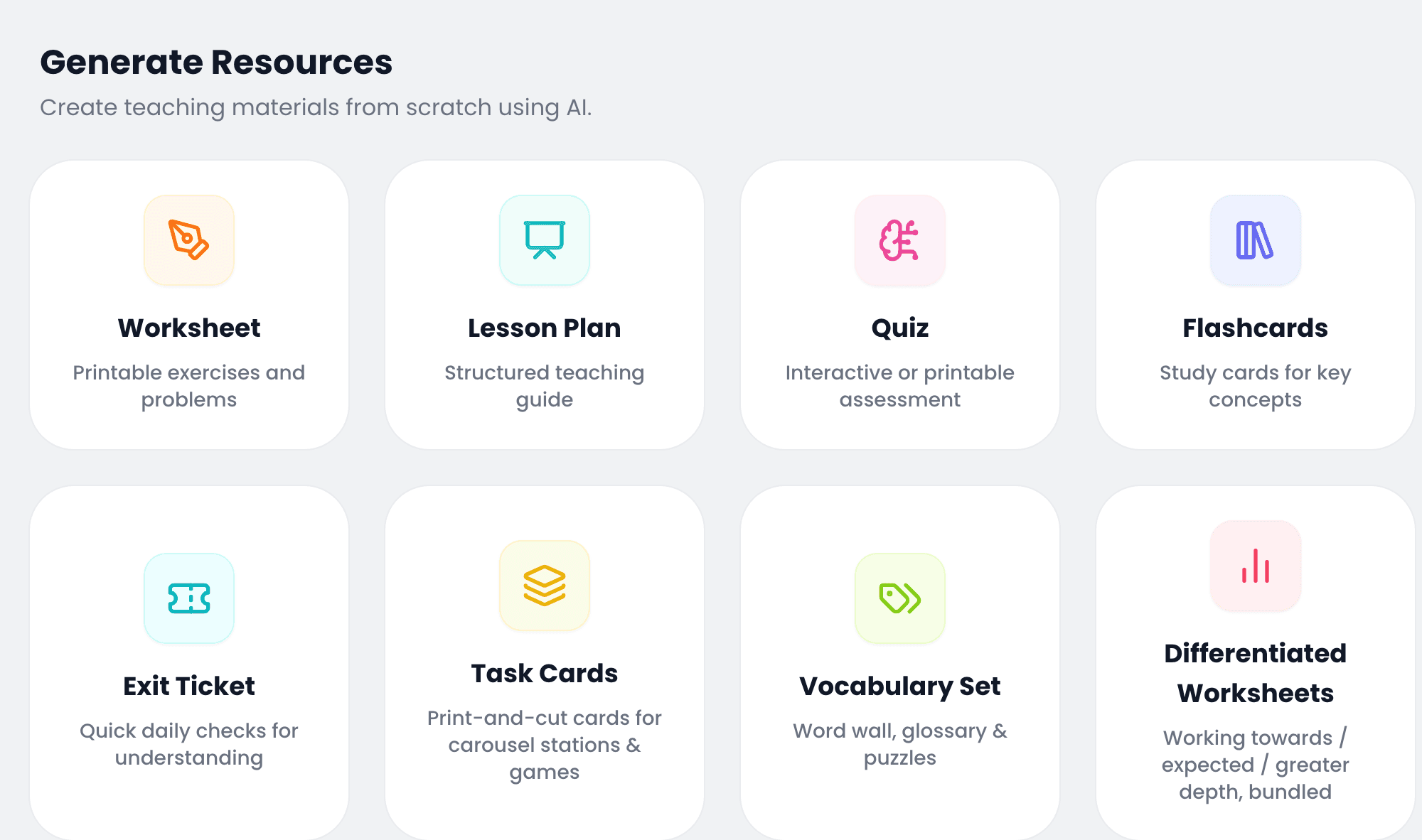
The Studio create screen, showing the eight resource types a teacher can generate: worksheet, lesson plan, quiz, flashcards, exit ticket, task cards, vocabulary set and differentiated worksheets.

Two paths, one app

Start with what you have, or start from nothing

Teachit Studio covers both ends of lesson prep - turning material you already have into study content, and generating brand-new resources when you don’t.

Transcribe what you have

Upload a PDF, paste a YouTube link, or record a lesson. Teachit Studio reads it and writes a study note you can edit and ask questions about, and turns that note into a quiz and a flashcard deck when you are ready - all grounded in your own material.

PDFYouTubeAudio
See how it works ↓

Generate something new

No material yet? Pick from 8 resource types - worksheet, quiz, task cards, vocabulary set and more - describe the topic and year group, and get a classroom-ready, branded PDF while you get on with something else.

WorksheetsQuizzesLesson plansFlashcardsExit TicketsTask CardsVocabulary SetsDifferentiated Worksheets
See all 8 types ↓

What actually prints

Made for your class

Click any page below to read the whole PDF it came out of. A Year 2 sheet gets a thick rounded frame and type a seven-year-old can read across the room. By Year 10 the frame is gone entirely and the page reads like a sixth-form handout. Each subject brings its own colour.

  • Worksheet

    Year 2 · Art & Design

    The playful end: a thick rounded pink frame, a bold rounded display face, and a star row along the bottom - built entirely from colour names, never a swatch, so it reads the same way in black and white.

  • Mark scheme

    Year 2 · Art & Design

    Reasoning pitched at six- and seven-year-olds, under a solid pink Mark scheme banner, and the mix-up each one tends to make.

  • Cover

    Year 4 · Maths

    One brief, three levels, seventeen pages in a single file.

  • Working towards

    Year 4 · Maths

    The same topic re-pitched: single-digit divisors and the same fully worked example, one step at a time.

  • Worksheet

    Year 5 · Maths

    Still framed and rounded, but a tighter grid and more items to the page.

  • Mark scheme

    Year 5 · Maths

    Every answer carries its working and the mistake pupils usually make, under the same indigo Mark scheme banner - down to the fraction a word problem's answer gets reversed into.

  • Flashcards

    Year 6 · Modern Foreign Languages

    Cut lines, not a page frame - and this side gives the English word and sentence for the French question the pupil is quizzing on.

  • Quiz

    Year 7 · English

    Secondary school: a purple rule under name, date, class and mark, and lines invented for the quiz rather than borrowed from a text.

  • Mark scheme

    Year 7 · English

    The correct option filled solid purple, and why it is correct - including a simile borrowed straight from Shakespeare's Macbeth.

  • Lesson plan

    Year 8 · Science

    Science teal: objectives, a materials list naming real reagents, and a safety note for the ethanol and iodine.

  • Lesson plan

    Year 8 · Science

    Six activities carrying their own timings - 6, 8, 9, 10, 7, 5 - which total the 45 minutes asked for.

  • Worksheet

    Year 10 · Design & Technology

    The restrained end: no page frame, a rust rule under the title, and a worked example converting kilojoules to kilocalories before the UK front-of-pack panel itself.

  • Mark scheme

    Year 10 · Design & Technology

    The same mark scheme treatment as the Year 2 sheet, under a solid rust Mark scheme banner - down to working out an energy comparison in kilojoules.

What it does

What Teachit Studio takes off your plate

Six things you’d otherwise be doing at 9pm on a Sunday - whether you’re starting from a source or a blank page.

From material you already have

Notes from anything

PDFs, YouTube videos, audio recordings, even a live lesson - Teachit Studio turns it into structured, readable notes.

Chat with your materials

Ask a question about the PDF or video and get a direct answer, with the source close at hand.

Clear, structured summaries

The important parts, surfaced - without wading back through 40 minutes of video.

From a blank page

Any resource, on demand

Pick from 8 resource types - worksheets to differentiated worksheets - add a topic and year group, and get a complete, ready-to-teach resource with no source document required.

Built-in differentiation

Working towards, expected standard, greater depth or mixed - generate the same lesson at the level each class actually needs.

Classroom-ready PDFs

Every worksheet and lesson plan renders as a branded, print-ready PDF - no reformatting before it goes on a desk.

How it works

From material to lesson-ready in four steps

1

Upload or paste a link

A PDF, a YouTube link, an audio file - whatever you're already working from.

2

Studio reads it

It finds the key concepts, terms and structure - no manual tagging required.

3

Your note appears

It builds in the background, so you can close the tab. It is waiting in My Library when you get back.

4

Add a quiz, then share

One click on the finished note, built from what it just read. Edit anything that needs your touch, then send it to your class.

Don’t have source material? Generate a resource from scratch →

See it in action

A mark scheme you can actually check

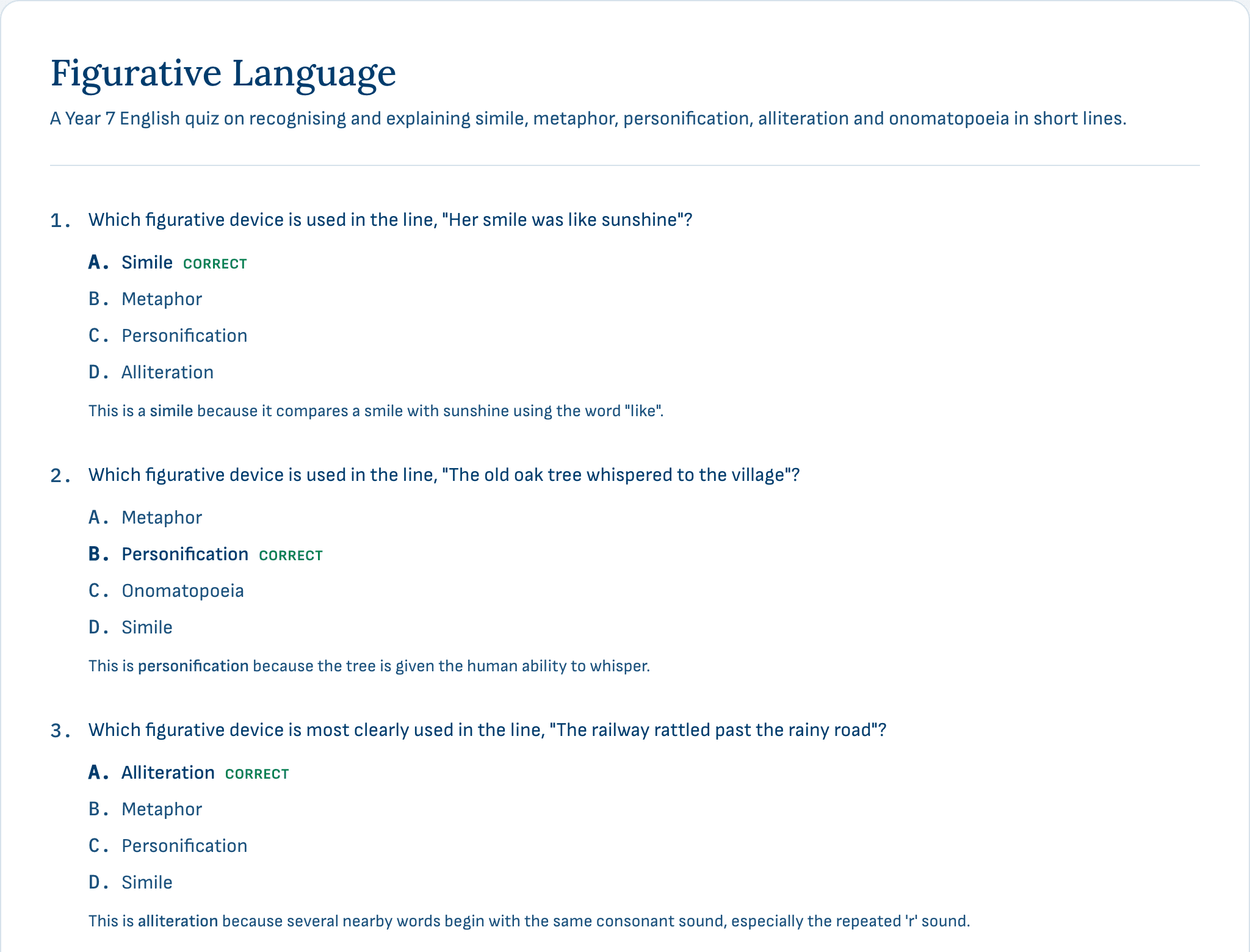
A quiz is only as useful as its mark scheme. Here is a real generated one, published in full with its answers marked and the reasoning behind each. Read it before you decide whether to trust it in front of a class.

Answers marked - every question carries its correct option and why it is correct.

Two copies - a pupil sheet and a teacher copy, from one generation.

Editable - treat the AI draft as a first pass, not the final word.
No material required

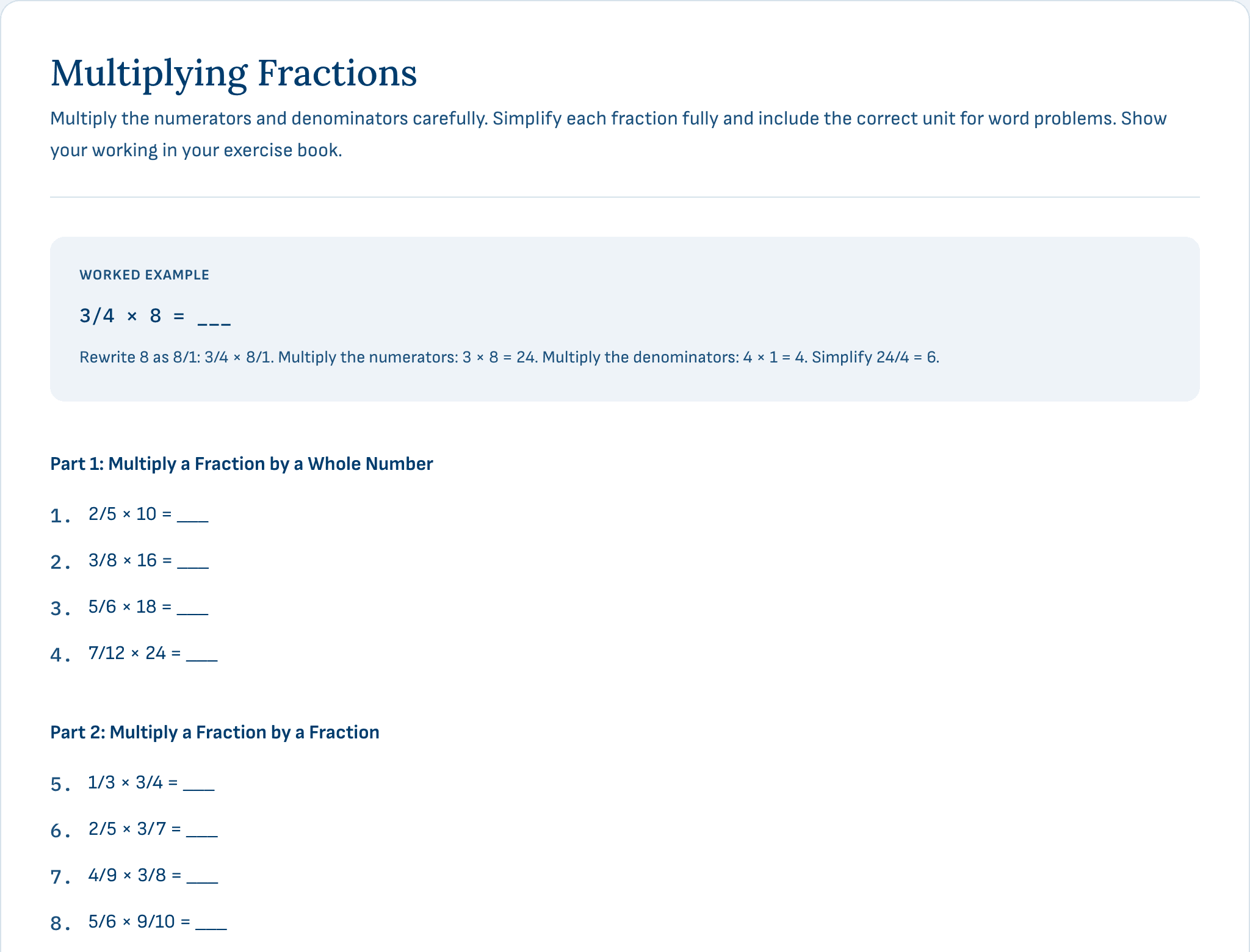
A finished worksheet, not a blank template

Pick a resource type, tell Teachit Studio the year group, topic and difficulty - it drafts the whole thing, tiered and ready to print.

Curriculum-aware - add a National Curriculum reference or a specification point and it's woven into the content.

Differentiated - generate working towards, expected standard or greater depth versions of the same resource in one pass.

Print-ready - every resource renders as a branded PDF your class can use immediately.
Questions

Frequently asked questions

Everything you need to know.

No. Sign in with the same Teachit account you already use, and manage your subscription from your Teachit profile - there's no separate account to create.
No. Transcribe is for when you already have a PDF, video or recording. Generate is for when you don't - pick from eight resource types, add a topic and year group, and Teachit Studio builds it from scratch.
Worksheet, quiz, lesson plan, flashcards, exit ticket, task cards, vocabulary set, and Differentiated Worksheets - one worksheet levelled three ways for mixed-ability classes. Pick a type, add a topic and year group, and Teachit Studio builds it - no source material needed.
Teachit Studio works directly from your material and keeps a link back to the source on every note, so anything you want to confirm is one click away. Most notes are ready to use as they come. AI can make mistakes, so give it the same read-through you would give any resource before it reaches your class.
PDFs, YouTube links, and audio recordings today, with more formats on the way. Files go up to 50MB; an uploaded recording can run to 90 minutes, a YouTube video to 45 (or 30 if the video has no captions of its own, since we then have to listen to it), and a lesson you record in the browser to 20. And if you don't have material yet, use Generate a Resource to build any of eight resource types - worksheet, quiz, lesson plan, flashcards, exit ticket, task cards, vocabulary set, or Differentiated Worksheets - from just a topic and year group, no upload required.
Every account gets 2 free generations to try it out. A Teachit subscription raises that to up to 30 resources a month, with the AI tutor on every note - it's the same subscription that unlocks their other resources, not a separate one. Almost everything costs one generation; the exception is Differentiated Worksheets, which costs one per level.
Only a fair-use one, and you are very unlikely to meet it. A subscription covers 500 chat messages a month, resetting at the start of each calendar month. Free accounts get 10 messages in total, across every note, as a way to try it. The ceiling exists so a stuck browser tab cannot run up a bill - a normal week of teaching is nowhere near it.
Yes. Open any quiz - a Quiz resource, or one you added to a transcribed note - choose Assign to class, and you get a QR code, a link and a short code. Exit tickets work the same way, and a multi-day bundle lets you pick which day you are running. Show on projector puts all three on the screen so the class can scan or type it. Pupils type a name and start - no account, no sign-in, nothing to install. You watch the results fill in live and can download them as a CSV. The link stays open for 4 hours and the whole session, names and answers included, is deleted within 24.
Every resource comes as a branded, print-ready PDF - and for the ones with a mark scheme, as a pupil copy and a teacher copy from the same generation. There's also a Word (.docx) export, in beta, for when you need to change something before you hand it out. You can print straight from the page too, or put a quiz, flashcard deck or lesson plan on the projector.
A read-through is usually all it needs. Teachit Studio writes with AI, and AI can make mistakes, so look it over before it goes in front of your class - the same look-over you would give anything you did not write yourself. Worksheet and exit ticket mark schemes also go through a second automated pass that re-works every question and corrects the marking before it reaches you.
Your uploads and notes are yours - private to your account unless you choose to share them with your class. Pupils who join a live quiz never create an account, and everything from that session is deleted within 24 hours. You can delete any note, or your whole Studio account, yourself at any time. The privacy policy sets out what is collected, which providers process it, and how long each thing is kept.

Ready to get your evenings back?

Free to try - up to 30 resources a month included with a Teachit subscription.